

Material Testing
Material Testing
Material testing is a respected technique that evaluates the precise physical and mechanical properties of raw materials and components. Material testing instrument is employed to determine the components and properties of materials in order to ensure quality, safety and performance in a variety of applications. In the construction industry, for example, material testing instrument is essential to ensure that a specific material is fit for its intended purpose. By undertaking material testing, it’s possible to identify potential weaknesses and then select ideal materials to prioritize safety and integrity long-term. With this in mind, it’s easy to see why material testing instrument is also vital in the fields of aeronautical engineering, automotive and electronics manufacturing.
Technical Classification of Material Testing Instruments
To achieve high-precision results, material test equipment is generally categorized by the nature of the force applied and the data required for analysis.
Destructive Testing Systems
These test machines apply force until the material deforms or fails, providing critical data on the material's limits.
- Tensile testing
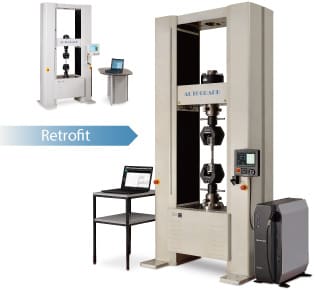
Tensile testing machines are the most common material test instruments and involve a sample piece being extended to the point of fracture to determine the level of resistance to force that the material can withstand. - Compression testing
Compression testing involves applying compressive pressure to a sample material to understand how it reacts to crushing loads. As the load is applied to the material, test machines will determine its elastic limit, yield point and yield strength.
Fatigue and Durability Evaluation
Advanced testing systems simulate real-world environmental stressors, such as vibration or thermal cycling, to predict the lifespan of a component.
- Fatigue testing
Fatigue testing is focused on understanding whether materials can withstand repeated exposure to forces. This approach to material testing determines the resistance of materials to strength loss, damage and failure when a load is applied. Testing machines use extremely sophisticated technology to simulate earthquakes and other loading behaviour experienced in actual usage.
Shimadzu: 100 Years of Precision in Material Test Equipment
Material testing is an essential step in the processes of many industries and applications. For this reason, the level of precision, accuracy and reliability that material testing instrument offers is of utmost importance. Shimadzu has been manufacturing state-of-the-art material testing instrument for over 100 years, with a comprehensive high-performance product portfolio that employs cutting-edge technology to meet international standards. With solutions for universal/tensile testing, fatigue/impact testing, hardness testing, viscosity and flow testing, large-scale structure mechanical evaluation testing, and high-speed video camera testing/imaging, Shimadzu is renowned for material testing instrument that delivers reliable, repeatable results across numerous industries, ensuring quality control and optimizing research and development.
FAQs
What is the difference between high-cycle and low-cycle fatigue testing?
Fatigue testing is generally categorized based on the intensity and frequency of the load:
- High-Cycle Fatigue (HCF): Focuses on lower loads over millions of cycles, common in vibrating components.
- Low-Cycle Fatigue (LCF): Involves higher loads that cause plastic deformation, typically resulting in failure in fewer than 10,000 cycles. Both types of analysis can be performed using a high-performance fatigue testing machine or a specialized servopulser system.
Why is a hydraulic testing machine preferred for heavy-duty components?
A hydraulic testing machine is the go-to choice for large-scale structural components in the construction and automotive industries. Because hydraulic actuators can generate massive amounts of force with high stability, they are ideal for testing the durability of heavy steel beams, engine blocks, and large-scale fasteners that electromagnetic systems may not be able to accommodate.
Can fatigue testing be conducted under extreme environmental conditions?
Yes. Modern fatigue testing often requires simulating real-world environments. By integrating environmental chambers with your fatigue testing machine, you can test materials at extreme temperatures (ranging from -320°F to over 1839°F) or in corrosive environments to see how these factors accelerate material degradation and reduce fatigue life.