

LabSolutions™ DB/CS - Features
Analytical Data System

Convenient Operating Environment
Software with Integrated and Common Operating Feel


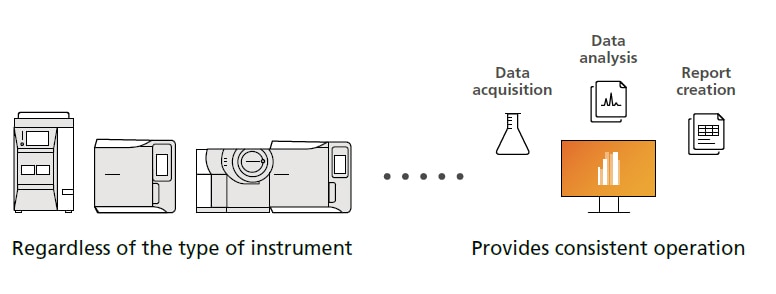
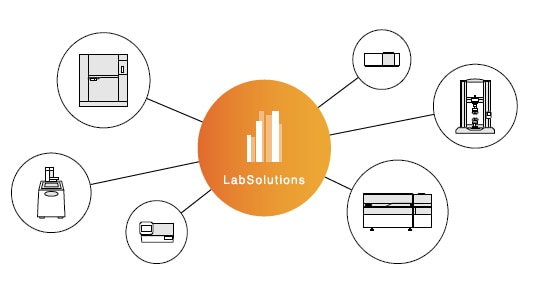
LabSolutions provides consistent operation for all instrument types and functions, such as data acquisition, data analysis, and report creation. That makes it easy to learn operating methods, regardless of the type of instrument, which can help reduce learning costs.
Check Instrument Operating Status at a Glance
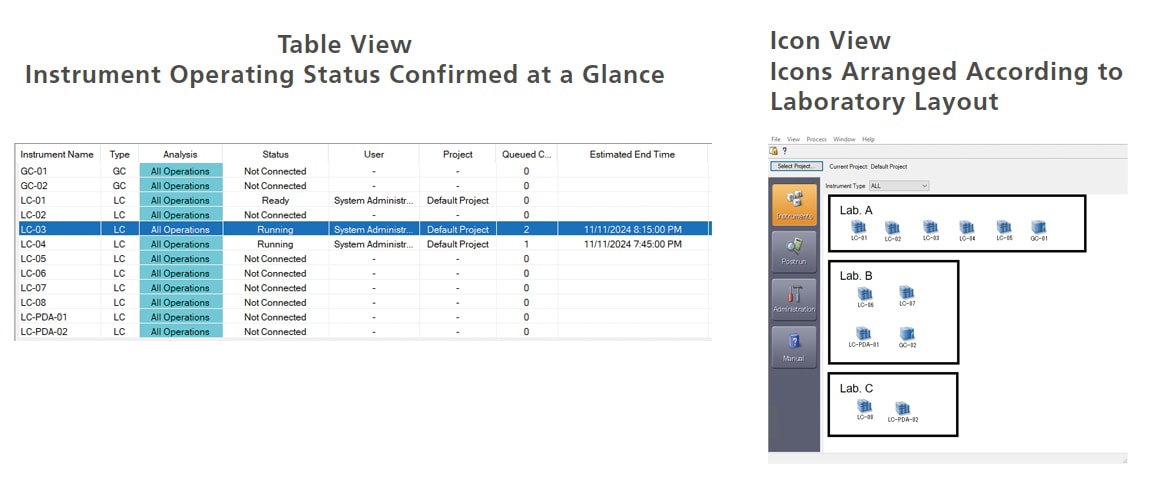
The instrument operating status monitor enables verifying the operating status of connected instruments or checking the scheduled data acquisition finish time for each instrument. Furthermore, LabSolutions CS can be used to check the operating status of all instruments connected to the network. As a result, even if multiple LC, GC, or other instruments are operating concurrently, their operating status can be determined at a glance, which is useful for scheduling analytical processes based on instrument availability. In addition, instrument icons to be freely arranged, such as based on their actual layout in the analytical instrument room.
Enables Control and Data Analysis Operations from Computers Other Than the Analysis Computer
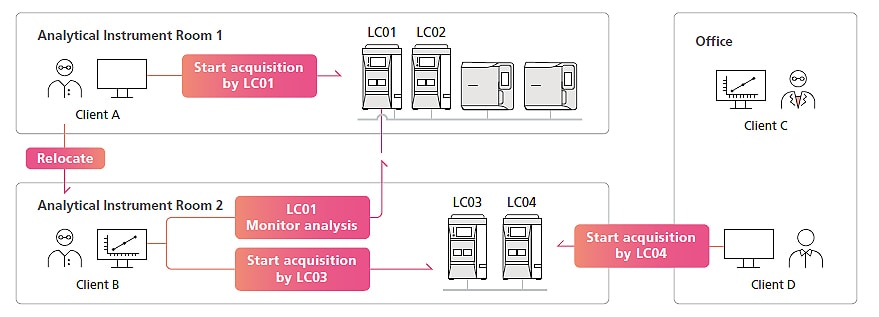
For standalone systems, the computer connected to instruments is used exclusively by the person performing the analysis, with other users unable to view or further analyze data. LabSolutions CS ensures free access to instruments and data, regardless of the laboratory, office, or other location, while also maintaining security. For example, analysis condition settings can be checked before starting data acquisition and acquisitions can be started from a client computer in the analytical instrument room. After acquisitions are started, the operating status can be checked, instruments controlled, and data analyzed from a client computer in the office. That can increase the efficiency of analytical work, such as monitoring the acquisition progress, controlling instruments, and preparing reports.
Note: Data acquisition and data analysis operations are only supported for LC, GC, LC-MS, and GC-MS systems.
Quickly Search Vast Amounts of Data
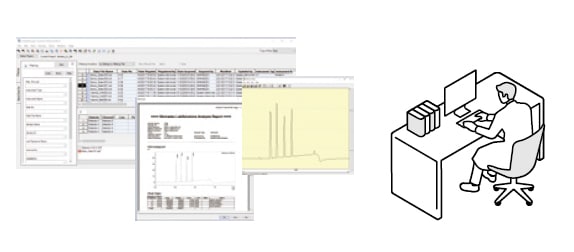
All data obtained from analysis is managed in a LabSolutions database, with not only test results but also linked files viewable via Data Manager. LabSolutions CS manages all data centrally on a server, so data can be viewed from anywhere. It also includes more advanced search functionality for quickly finding target data, such as searching all data obtained during a given analysis schedule.
Including Data from a Variety of Instruments in One Report
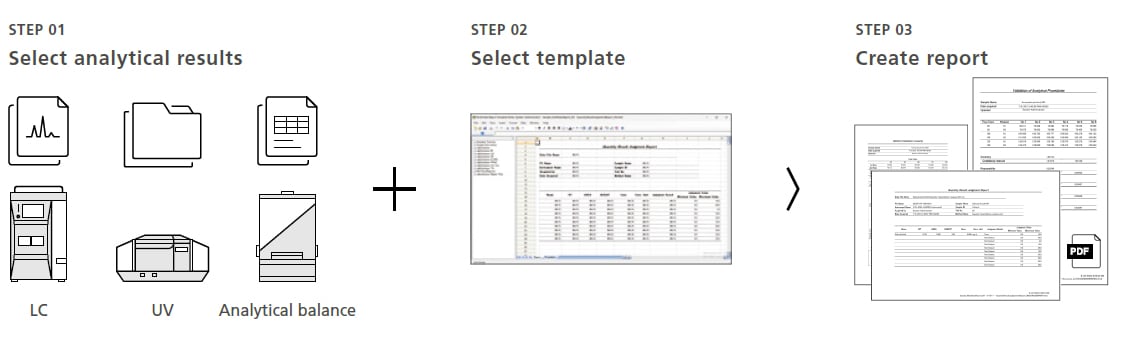
Using Multi-Data Report functionality, reports can be created in a spreadsheet to suit a wide variety of objectives. Reports that include quantitative calculations and graphs can be created by simply selecting analytical results and a previously prepared template. This eliminates the need to manually transcribe data from various laboratory notes, spreadsheet software, or other sources, which can help reduce human errors and prevent data alterations or falsification.
For more details about the multi-data report option, please click here.
Data/Report Reviewing/Approval Process Accomplished via Software
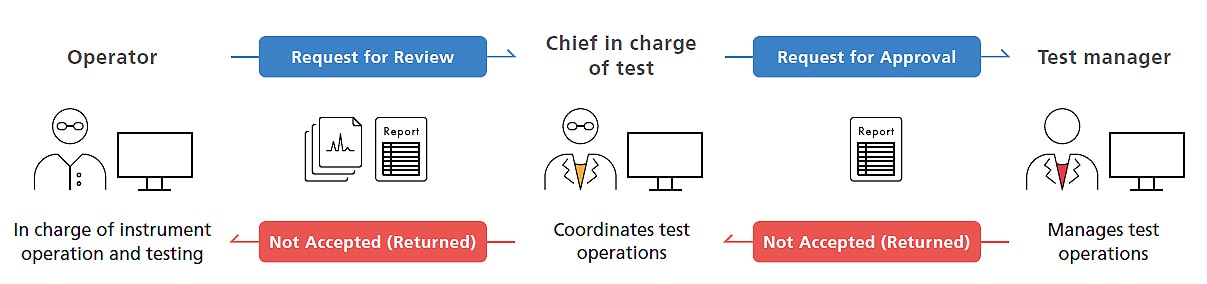
Analytical data is centrally managed in a LabSolutions database, reports can be viewed using Data Manager, and data files can be approved electronically according to the customer workflow. Also, a record of reviewing the content of reports can be included anywhere in the test results report, which is output as a PDF file. Thus, the same software can be used to review and approve data/reports in order to establish paperless electronic operations.
Supports Diverse Operating Practices
Integrate/Manage a Variety of Analytical Instruments
LabSolutions CS can centrally manage data, operation logs, and other information for non-chromatography instruments, user account information, and system security information in a LabSolutions database. In addition, by using optional Multi-Instrument Data Registration functionality, raw data from a wide variety of analytical instruments, PDF reports, and other information can be automatically saved in a LabSolutions database to help ensure secure data management.
Note: For more details about supported instruments or analytical systems, contact a Shimadzu representative.
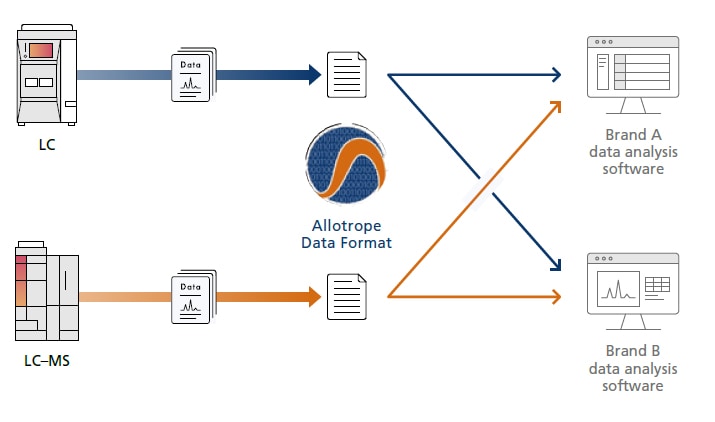
Flexible Support for Output in Common Formats
In recent years, there have been active efforts to try harmonizing data formats to avoid dependence on the data formats of specific manufacturers or software. LabSolutions supports outputting data in the format specified by the Allotrope Foundation, an international consortium of pharmaceutical companies, biotech companies, analytical instrument manufacturers, and software vendors, so that data can be utilized independently of specific manufacturers or software.
For more details about the multi-data report option, please click here.
Note: Conversion to the Allotrope data format requires an additional software license. Contact Shimadzu for further details.
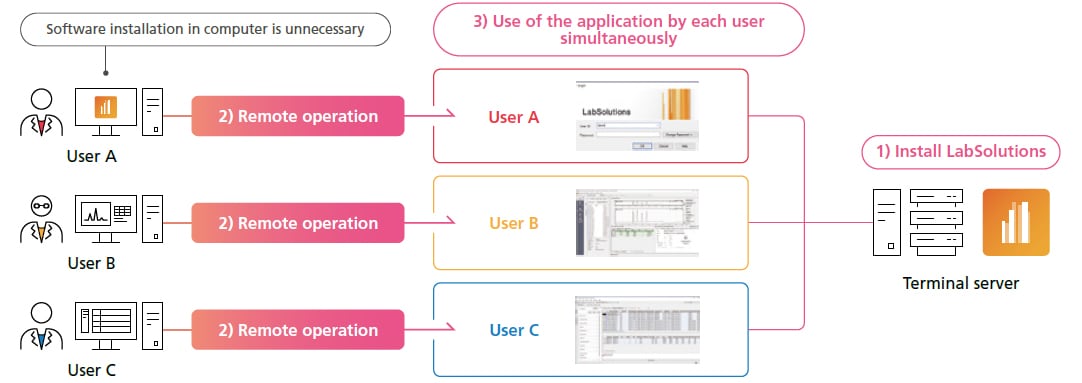
Checking Data and Reports without Installing Software
LabSolutions CS supports Terminal services, so data and reports can be checked without installing LabSolutions software in the terminal client computer. Furthermore, for LC, GC, LC–MS, and GC–MS systems, data acquisition, data analysis, and report creation operations can be executed via respective terminal client computers. LabSolutions software is only installed in the terminal server, which significantly reduces the time and trouble of updating software or managing software content.
Supports Cloud/Remote Operating Environments and Configuring Networks that Extend beyond Single Facilities
By establishing a LabSolutions server and terminal server in a cloud environment and connecting each facility to the cloud environment via a secure network, a network that extends beyond an individual facility can be established regardless of the location. Establishing a terminal server also allows viewing data, reviewing reports, checking instrument status, and checking acquisition status via the network from individual computers outside of the analytical laboratory, such as from a home or office.
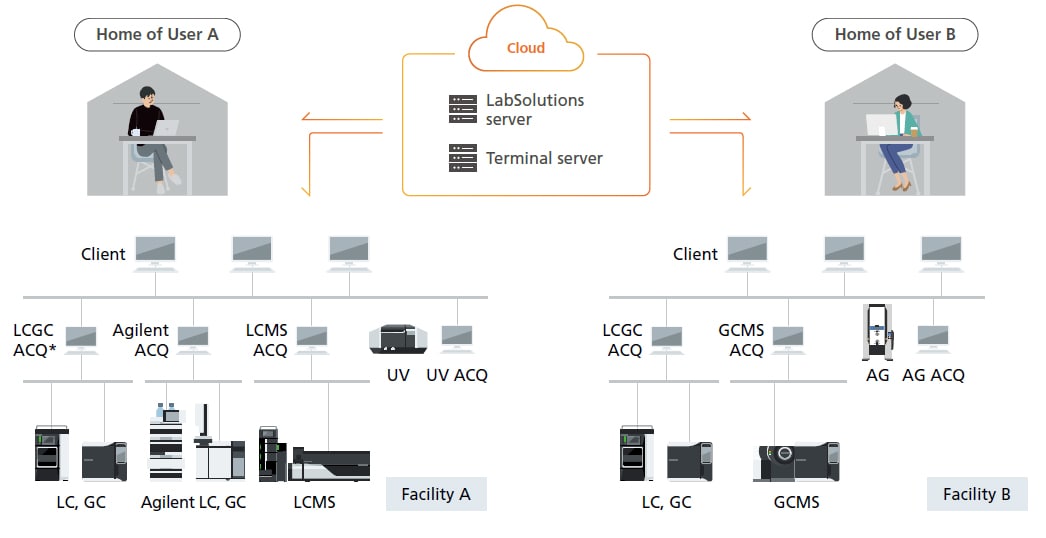
*ACQ: Acquisition controller computer for controlling analytical instruments
Safe/Secure System and Data Management
Preventing Human Errors by Database Management
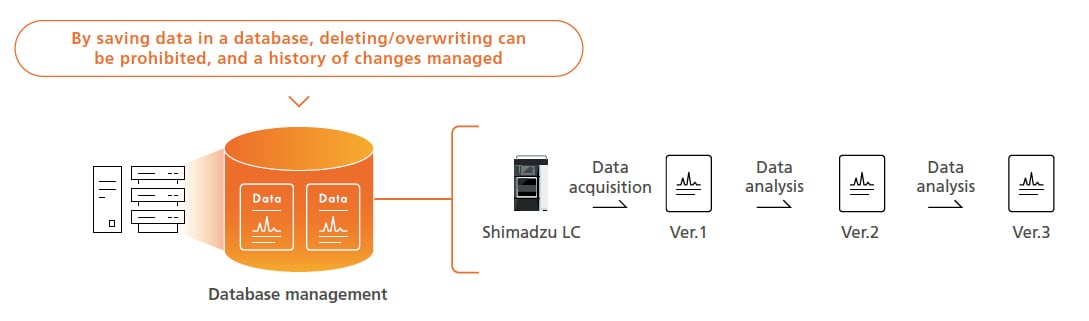
Using a database ensures analytical data can be managed securely and analytical data histories in a database can prevent operator errors, such as overwriting or deleting data. If analytical data is analyzed, the data from Postrun Analysis is saved as a separate set of data (using version numbers) that is linked to the original data instead of overwriting it. That makes it easy to check past data.
Robust Security
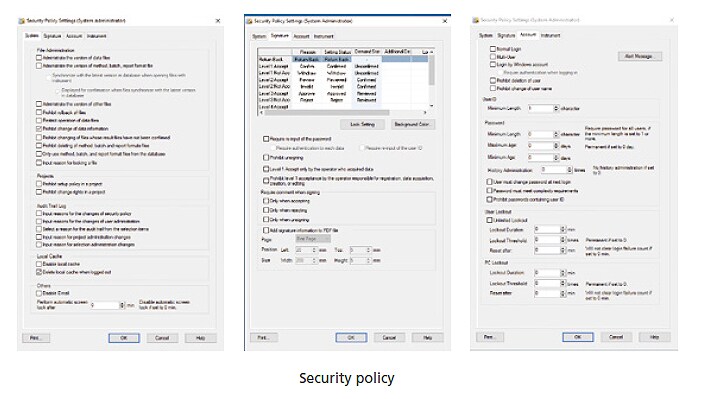
Many policies are provided to strengthen system security. For example, electronic signature workflows, minimum password lengths, validity periods and other password policies, audit trail settings for ensuring data integrity, and other settings can be customized in detail based on actual operations. Furthermore, the basic settings for ensuring data integrity can be automatically specified collectively.
Manage Not Only Data but Also User and System Information Centrally in a Server
With LabSolutions CS, user and system information is managed centrally on a server, which reduces administrator workloads because it eliminates the need to manage users separately for each computer. By specifying a system backup schedule, the database can be appropriately backed up automatically, which can be used as a disaster recovery plan in case a hard drive failure or natural disaster occurs.
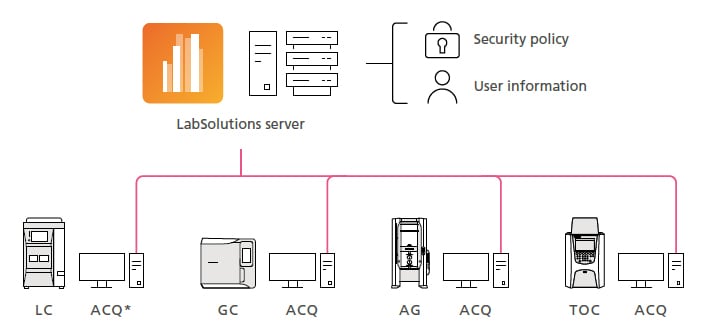
* ACQ: Acquisition controller computer for controlling analytical instruments
Managing Related Information for Each Project
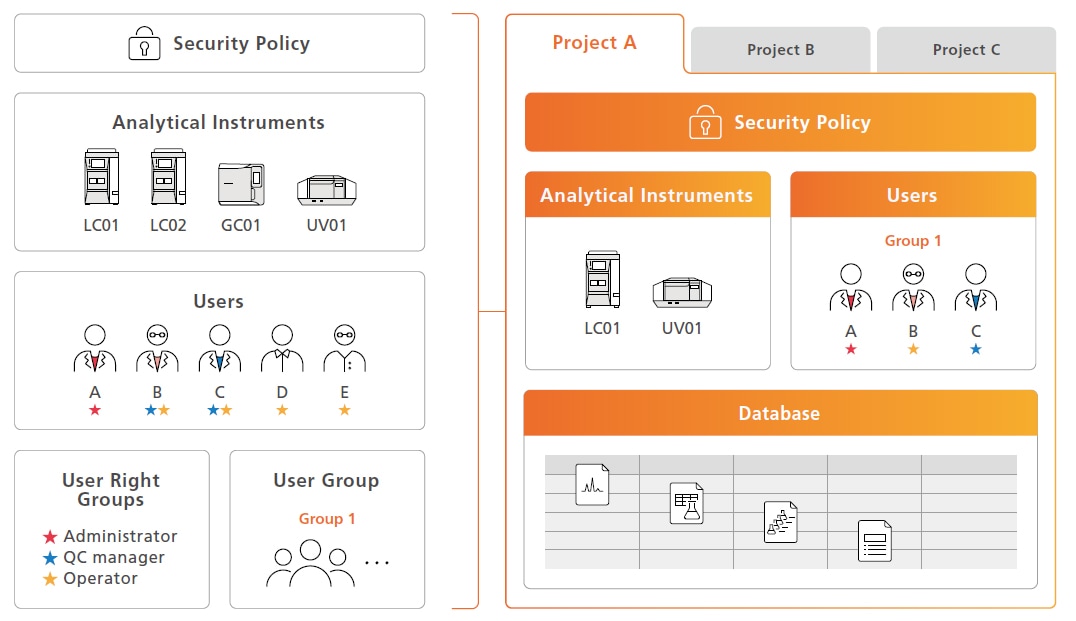
Instruments, users, security policies, data, and data analysis settings can be specified and managed for specific processes or systems referred to as “projects.” That can be used to ensure that only appropriate personnel can access appropriate information, helping to ensure data searching and management operations are accomplished securely.
Keeps Data Fully Protected Even if a Server Problem Occurs
For typical systems, a network problem or a server failure can result in losing the data being acquired or stopping analytical processes. With LabSolutions CS, even if a server problem occurs, the acquisition computer will continue to acquire data to prevent losing valuable customer data or samples. After server recovery, the analytical data is automatically saved in the LabSolutions server to promptly resume acquisition processes and minimize downtime.
System Automatically Records “Who,” “What,” and “When” Information
The system automatically saves a record of each change to data acquisition and data analysis parameter settings. It can also record the reasons for changing the parameter settings so that a detailed record is retained.
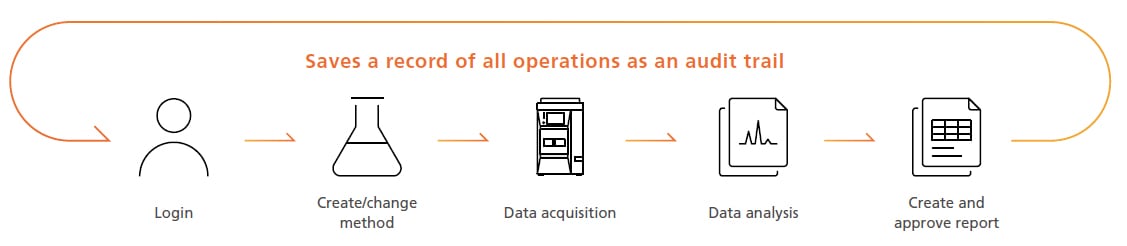
Optimization of Analytical Workflows and Laboratories
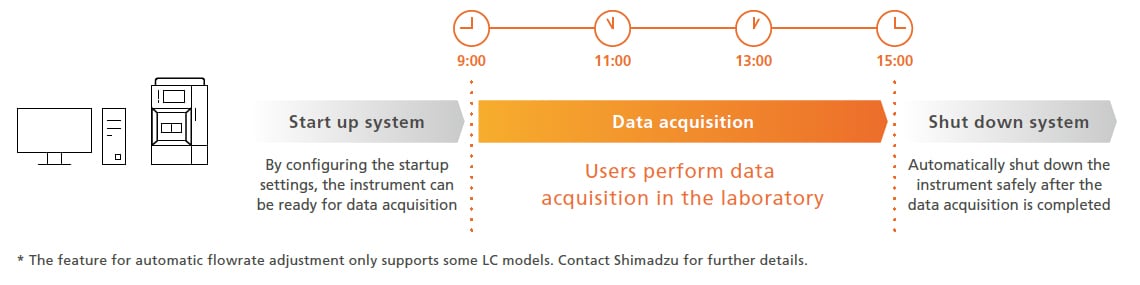
Provides Powerful Support for Analytical Workflows
LabSolutions improves the efficiency of workflows before and after analytical operations. "Automating instrument conditioning and safe shutdown optimizes the overall schedule, allowing users to focus on more advanced tasks.
Superior Data Analysis Increases the Reliability of Qualitative and Quantitative Results
LabSolutions includes many outstanding model-specific data analysis features to improve the reliability of qualitative and quantitative analysis operations.
Technical report on the representative data analysis features can be found here:
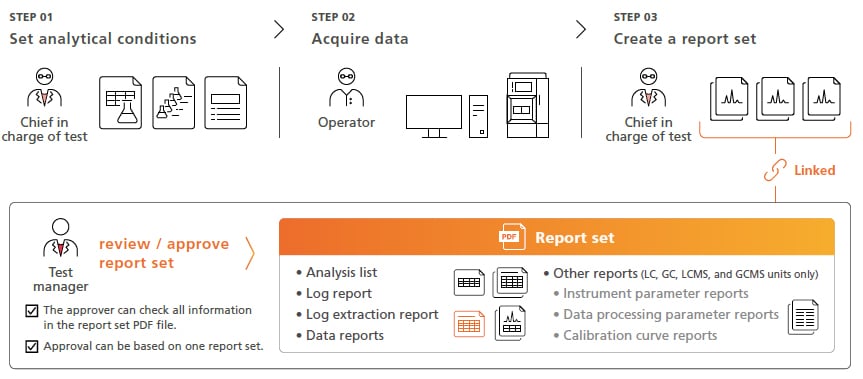
Report Set Functionality Improves Data Reliability While Also Increasing Operating Efficiency Log Review is also streamline
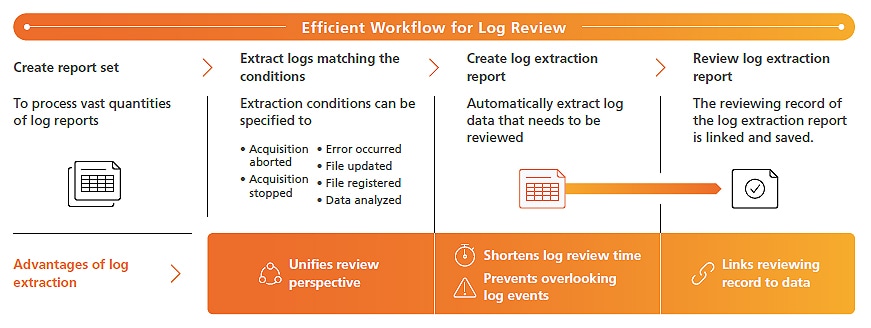
Report set is a proprietary LabSolutions feature that prepares a PDF file (report set) that combines analytical information, results, and conditions from a series of analyses (batch analyses) with a log of all operations, from beginning to end, performed during corresponding analytical operations. Creating a report set improves reliability by linking results from a series of analyses to prevent alterations or falsification and allows the information, operation log, and analytical results related to the analyses to be reviewed as a single report. By checking and electronically approving a single report set PDF file after analysis, linked data files can also be approved electronically to achieve a more efficient and simple approval process for each person involved. Additionally, log events that need to be reviewed can be prespecified to automatically LabSolutions DB/CS extract all corresponding log data necessary for reviews to more efficiently comply with increasingly strict regulatory requirements.