


PLUS ALGO™ - Features
Multi-Data Analysis Platform
Analysis Is Implemented in Two Simple Steps
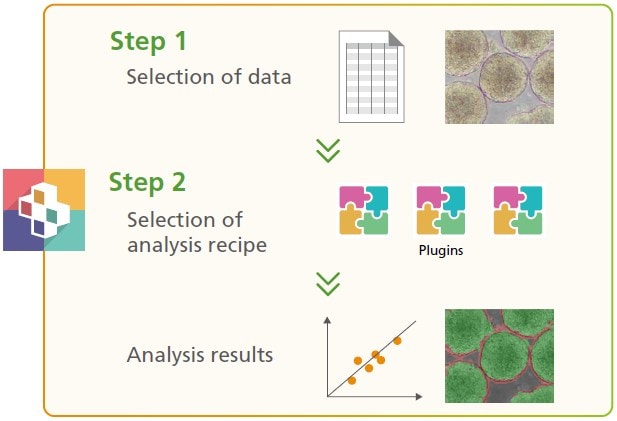
Analysis results can be obtained through a simple two-step process.
Step 1: Select Data
Select the data to be analyzed, such as tabular or image data, from the data registered in PLUS ALGO.
Step 2: Select an Analysis Recipe
Select the analysis recipe you wish to apply. Adjust parameters as needed to obtain the expected results.
You can also create and add custom analysis recipes according to your specific objectives.
Supports AI-Based Data Learning and Analysis
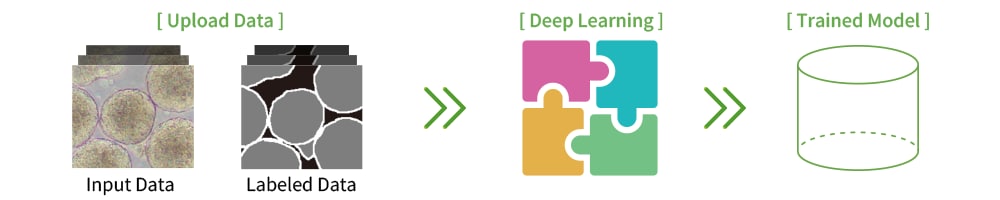
Learning
Using data registered in PLUS ALGO, you can intuitively generate trained models tailored to your specific challenges.
Learning workflow when the analysis target is image data
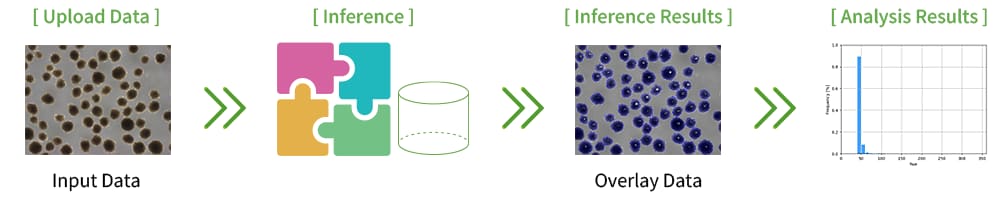
Analysis
Apply the generated trained model to the target data to obtain inference results and analysis outcomes.
Permission Settings Make Operations Safe for Multiple Teams and Departments
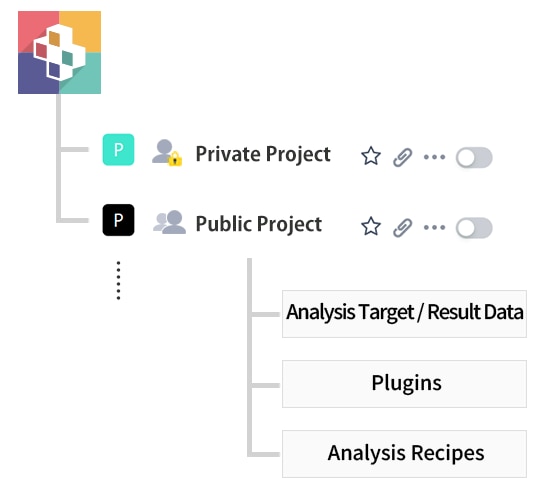
Data Access Permissions
Data confidentiality allows simultaneous operation across multiple teams and departments.
 |
Only project members can access target data, results, plugins, and analysis recipes. |
|---|---|
 |
All users registered in the system can access the project. |
User Permissions
Permissions can be assigned so that each user has access to the appropriate functions for their role.
| Function |  Operator (Standard) |
 Operator (Manager) |
 System Administrator |
|---|---|---|---|
|
✓ (Data deletion not allowed) |
✓ | ✓ |
|
— | ✓ | ✓ |
|
— | — | ✓ |