



LabSolutions

LabSolutions can increase workflow efficiency and strengthen compliance with data integrity requirements, providing solutions for a wide variety of industries and departments.

LabSolutions is an analytical data system that can simultaneously achieve higher analytical workflow efficiency and stronger data integrity compliance. It also offers flexibility for use in all sorts of industries and departments.


LabSolutions enables information to be managed easily and securely in a single database.

File-based data management offers convenience, but files can be easily renamed, overwritten, or deleted, leading to concerns about data falsification. By managing data in a database, such actions can be carefully restricted. LabSolutions databases enable not only data but also records of operations associated with the data and information about systems and users to be easily managed centrally.


LabSolutions CS

Freely Access Analytical Networks

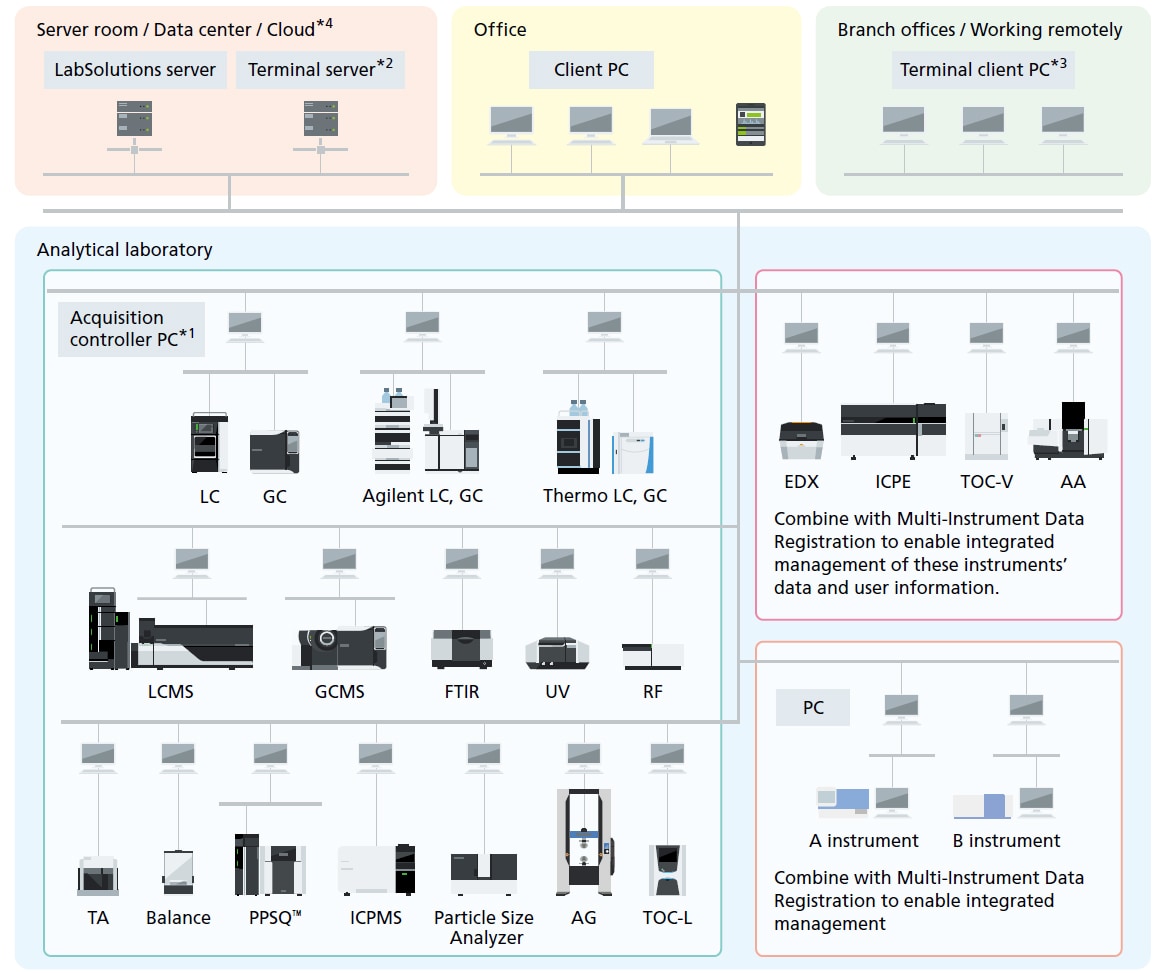
Because all analytical data is managed in a database in the LabSolutions server, the data can be viewed from any computer connected to the network. That means a client computer not directly connected to the instrument can be used to perform data acquisition or monitor and control instruments. Furthermore, Windows® Terminal Services can be used to view, electronically sign, acquire, or analyze data on any computer without installing LabSolutions software. It can also directly control non-Shimadzu LC and GC systems. In addition to the on-premises servers installed within the facility, it also supports various clouds (IaaS).

Analytical laboratory

*1 The acquisition controller PC controls analytical instruments. For LC, GC, LCMS, and GCMS, data acquisition and analysis operations are performed on a client PC.
*2 A terminal server is a server for using terminal services. Users can view data reports and perform electronic signature operations through terminal services. It is ideal for remote connections because of the low network load. Only LC, GC, LCMS, and GCMS support analysis and postrun operations through terminal services. 
*3 If a terminal service is used, LabSolutions software does not need to be installed on client PCs or tablets. 
*4 Servers can be built on various clouds (IaaS). AWS (Amazon Web Services), Microsoft® Azure®, GCP™ (Google Cloud Platform™)


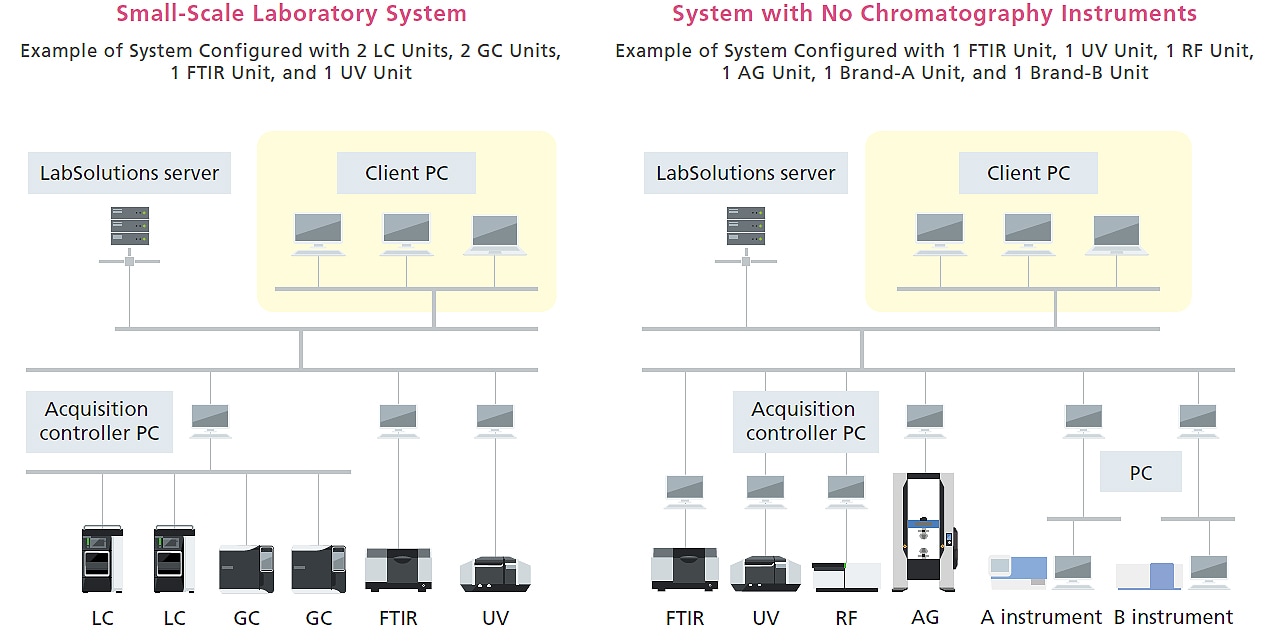
Systems Can Be Configured According to a Laboratory’s Size and Requirements

LabSolutions CS offers the flexibility to configure systems optimized for laboratory environments ranging from small-scale networked systems to large-scale environments. Also, additional instruments can be easily added later to expand the system. Furthermore, networked systems can be configured with only non-chromatography systems to reduce management costs by centrally managing instrument information and data.

Systems Can Be Configured According to a Laboratory’s Size and Requirements


LabSolutions DB

Achieving Safe Data Management with One Computer

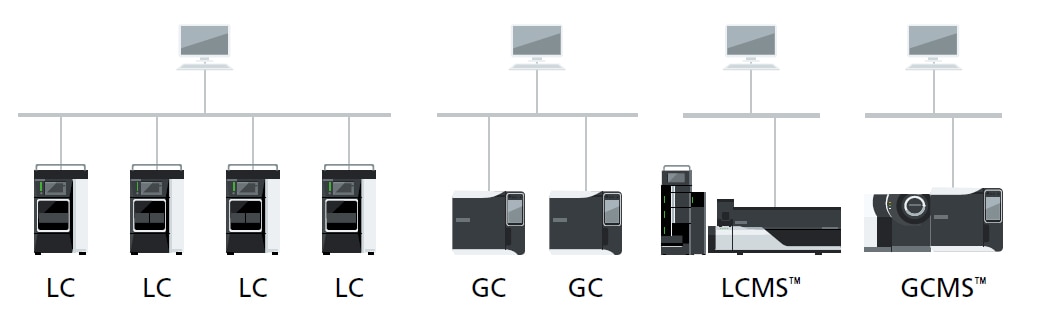
LabSolutions DB manages data from analytical instruments connected to only one computer. This standalone configuration is ideal for customers who want to manage data on one computer.

LabSolutions DB

*1 LabSolutions DB can be used for up to 4 LC or GC units at the same time.
*2 LabSolutions DB LCMS can be used for 1 system at a time.
*3 LabSolutions DB GCMS can be used for up to 2 GC–MS units at the same time.
*4 LabSolutions DB supports configurations with non-chromatography instruments controlled from an independent computer.

Networked vs Standalone Systems

LabSolutions CS, Networked Systems LabSolutions DB, Standalone Systems

· Many instruments and/or users

· Used to improve efficiency of data or system management

· Used to manage data and system information at multiple facilities

· Allows more flexible working environments

· Few instruments and/or users

· Used to strengthen data integrity compliance by isolating the system

Features

Learn more
{"title":"Downloads","description":"Download the latest brochure.","source":"product","key":5749,"max":30,"filter_types":["brochures"],"link_title":"View other Downloads","link_url":"","pdf_links":[]} {"title":"Applications","source":"product","key":5749,"max":3,"filter_types":["applications","application_note","posters"],"link_title":"Learn more","link_url":"\/an\/products\/software-informatics\/labsolutions-series\/labsolutions-dbcs\/applications.html","config_list":[],"page_links":[],"column_title":"Documents"} {"title":"Technical Documents","source":"product","key":5749,"max":3,"filter_types":["technical","technical_reports","white_papers","primers"],"link_title":"Learn more","link_url":"\/an\/products\/software-informatics\/labsolutions-series\/labsolutions-dbcs\/applications.html#tbaleAnchor_technical","config_list":[],"page_links":[],"column_title":"Documents"} {"title":"Manuals","source":"product","key":5749,"max":3,"filter_types":["manuals"],"link_title":"Learn more","link_url":"\/an\/products\/software-informatics\/labsolutions-series\/labsolutions-dbcs\/applications.html#tbaleAnchor_manual","config_list":[],"page_links":[],"column_title":"Documents"}

News / Events

Learn more