


Automated Dilution and Preparation of Standard and Sample Solutions for Analysis
Standard and sample solutions are typically diluted for HPLC analysis by a series of manual operations, which often require both experience and expertise. In addition, in many cases, they are time-consuming and labor-intensive. Automating these manual operations should significantly improve analysis throughput. This article describes the use of the sample preparation function of the SIL-40 series autosamplers, a key component of the Nexera series of ultrafast liquid chromatographs, to automate the dilution of standard and sample solutions. This function reduces the labor involved in quantitative analysis by using the absolute calibration curve method.
User Benefits
- Automated dilution by an autosampler eliminates labor-intensive manual dilution, improving efficiency and productivity.
- Automatically dilute samples and prepare calibration curves based on user-defined dilution factors configured in the batch table, all within a single method file streamlines the analysis process.
- The same method file is used regardless of the dilution factor, simplifying parameter configuration and file management when changes are made to HPLC conditions.
Preparation of Standard and Sample Solutions for the Absolute Calibration Curve Method
The absolute calibration curve method is one of the most common methods of quantitation in HPLC analysis. It involves preparing several target analyte standards of known concentration and analyzing them to obtain the correlation between analyte concentration and peak height or peak area, which yields a calibration curve. Sample solutions are then analyzed, and the analyte concentration in each sample is determined from the peak area or peak height obtained using the calibration curve. At this time, the calibration curve is typically prepared over a concentration range in which linearity is observed, and the sample solutions are diluted so that they fall within this range.
In such cases, by using the sample preparation function of the SIL-40 series autosampler, it is possible to simply set a stock standard solution of the analyte in the device and the SIL-40 will automatically prepare diluted standard samples based on user-configured dilution factors and inject them into the column. Similarly, for sample solutions, the SIL-40 automatically dilutes a stock sample to the user-configured dilution factor and injects it into the column.
Described below is an example in which the SIL-40 was used to measure caffeine levels in green tea and coffee by the absolute calibration curve method.
Automated Preparation of Diluted Standard Solutions and Column Injection
Standard solutions were diluted automatically and injected into the column according to the following procedure. (Fig. 1)
- Prepare a vial of stock caffeine standard (250 mg/L, aqueous solution) and set it in the SIL-40 series autosampler.
- Aspirate an amount of the stock caffeine standard solution based on the user-configured dilution factor and dispense it into a mixing vial (empty vial) together with a diluent (ultrapure water).
- Mix the stock solution and diluent in the mixing vial by repeated aspiration/ dispensation of its contents.
- Aspirate a prescribed amount of the diluted standard solution, which was prepared automatically, and inject it into the column.
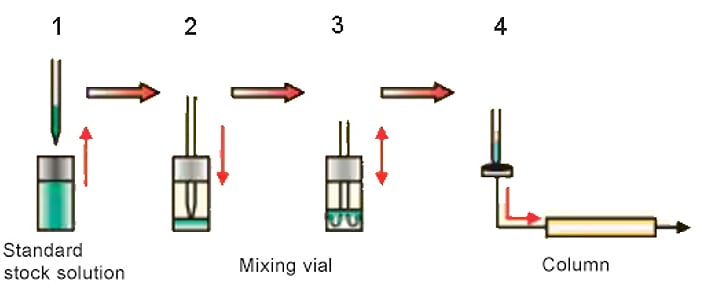
Fig. 1 Automated Preparation of Diluted Standard Solution
Pretreatment Program
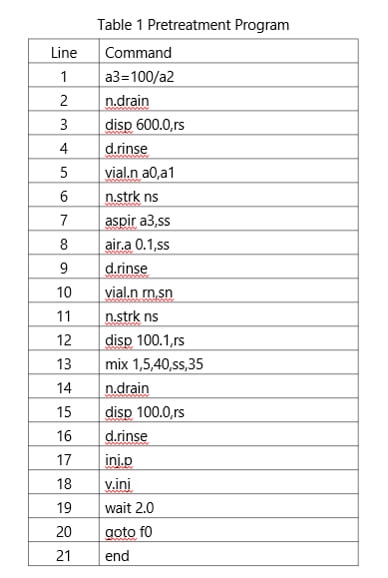
The method file collects the instrument parameters, analysis parameters, pretreatment program, and other information. The pretreatment program allows the use of dilution factors of 100 or above. By using the batch add-in (Fig. 3), a single method file can be used regardless of the dilution factor, helping to prevent human error. Dilution factors and mixing conditions are set in LabSolutions workstation. The setup window for the autosampler pretreatment program is shown in Fig. 2 and the commands are shown in Table 1. In this example, the final volume obtained after automated dilution is 100 μL.
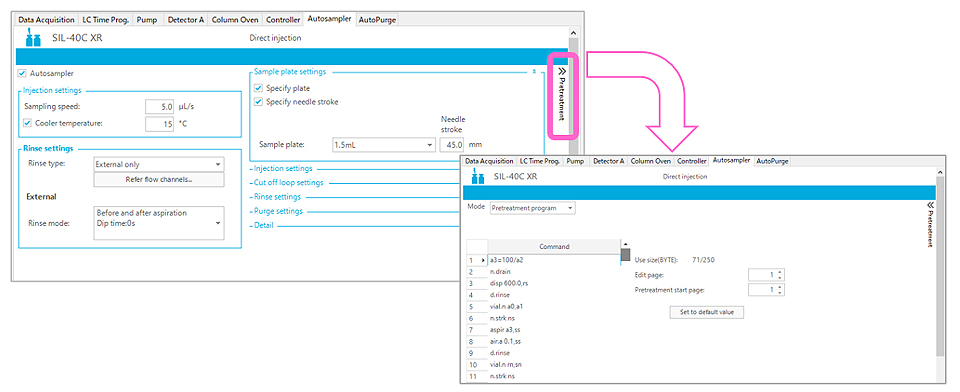
Fig. 2 Setup Window and Commands for the Autosampler Pretreatment Program
Configuring the Batch Table
A batch add-in called SIL pretreatment variables, which can be added to LabSolutions in advance*1, allows the users to populate the batch analysis table with the location of the stock solution and user-configured dilution factors. Fig. 3 shows the SIL pretreatment variables setting window for the batch table. Fields A0 to A2 are configured with the plate number of the vial containing the stock solution (A0), the vial number of the same vial (A1), and the dilution factor (A2). Empty vials (for mixing) used during automated dilution are set in prescribed locations based on the tray numbers and vial numbers in the batch table. If the sample type (standard) and level numbers are configured as shown in Fig. 3, a calibration curve is generated automatically after data acquisition (analysis parameters must also be configured separately).
*1 Contact Shimadzu for further details about adding this.
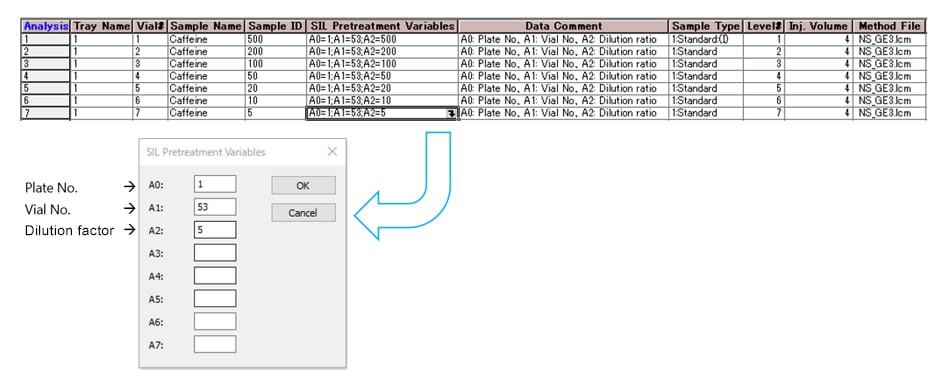
Fig. 3 Setup Window for Batch Table SIL Pretreatment Variables
Results of Standard Solution Analysis
Table2 Analytical Conditions
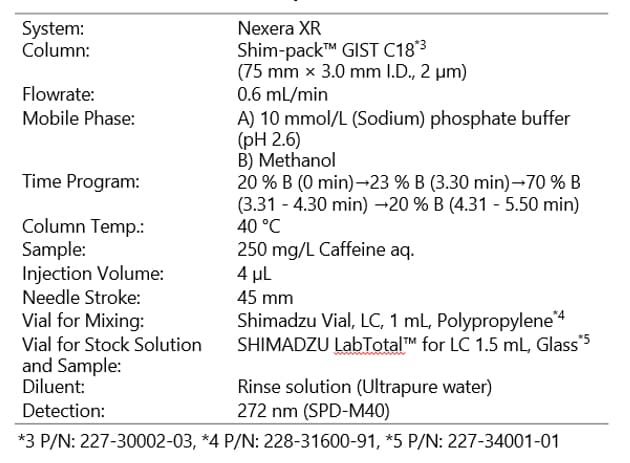
The SIL-40 was used to automatically prepare dilutions of the stock caffeine standard solution at dilution factors of 1:500, 1:200, 1:100, 1:50, 1:20,1:10, and 1:5 for analysis (final concentrations of each standard: 0.5, 1.25, 2.5, 5, 12.5, 25, and 50 mg/L). The analysis conditions used are shown in Table 2. 1.0 mL polypropylene vials were used for mixing and the stock solutions (standards and samples) were kept in septum vials. The rinse solution*2 (ultrapure water) was used as the diluent. Fig. 4 shows the chromatogram recorded for the caffeine standard solution diluted to a factor of 1:100 (concentration after automated dilution: 2.5 mg/L). The calibration curve obtained from analysis of the caffeine standard solutions is shown in Fig. 5. The calibration curve created using the automated dilution feature of the autosampler shows good linearity with a coefficient of determination (r2) of at least 0.999.
*2 For systems equipped with the multi-rinse feature, the rinse solution is configured in the autosampler’s system parameter settings.
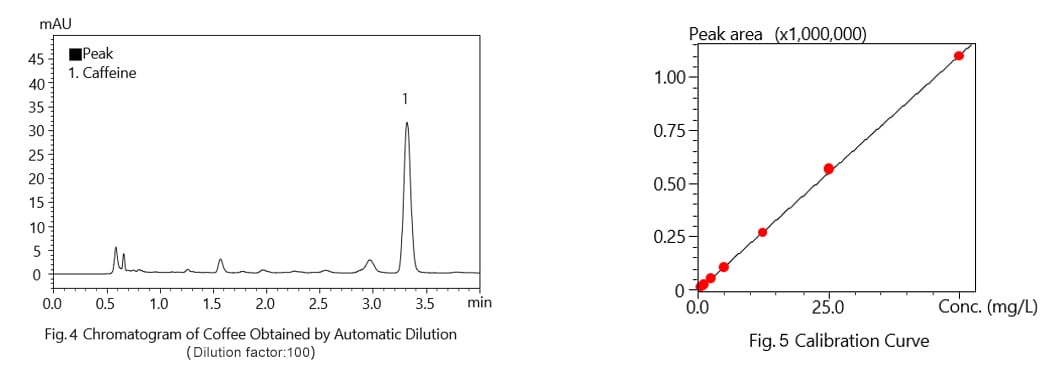
Table 3
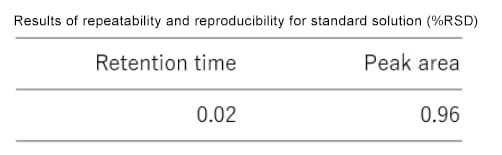
The caffeine standard solution prepared by diluting a 250 mg/L aqueous caffeine standard solution with ultrapure water to a factor of 1:500 (concentration after automated dilution: 0.5 mg/L) was analyzed six times. Table 3 shows the repeatability (%RSD) of the retention time and peak area measurements.
Results of Sample Solution Analysis
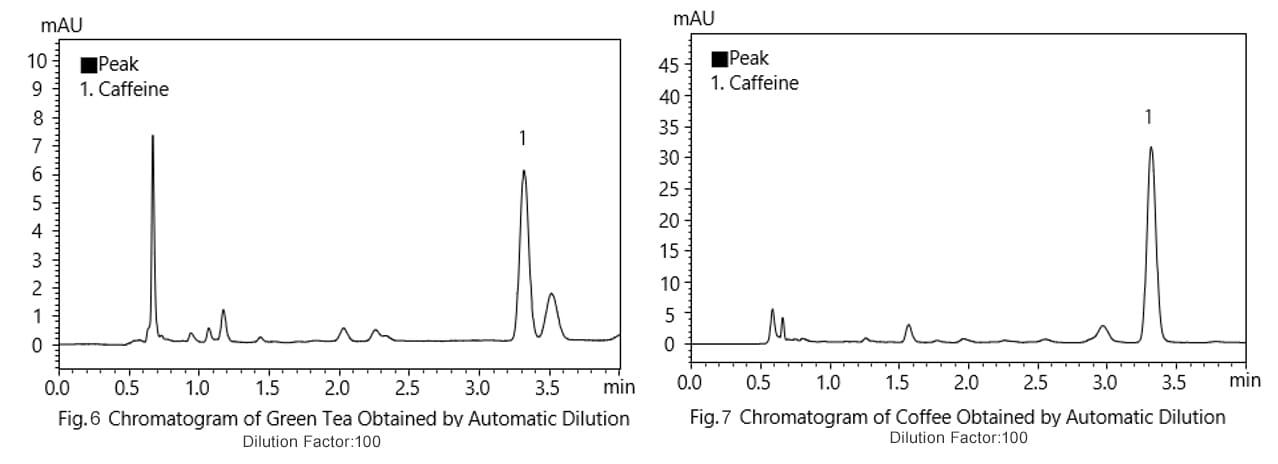
The automated sample preparation function of the SIL-40 series autosampler was also used to automatically prepare 1:100 dilutions of stock samples (green tea and coffee filtered through a 0.2 μm membrane filter) for analysis.
The chromatograms obtained from green tea and coffee are shown in Figs. 6 and 7, respectively.
Automated Calculation and Output of Component Content
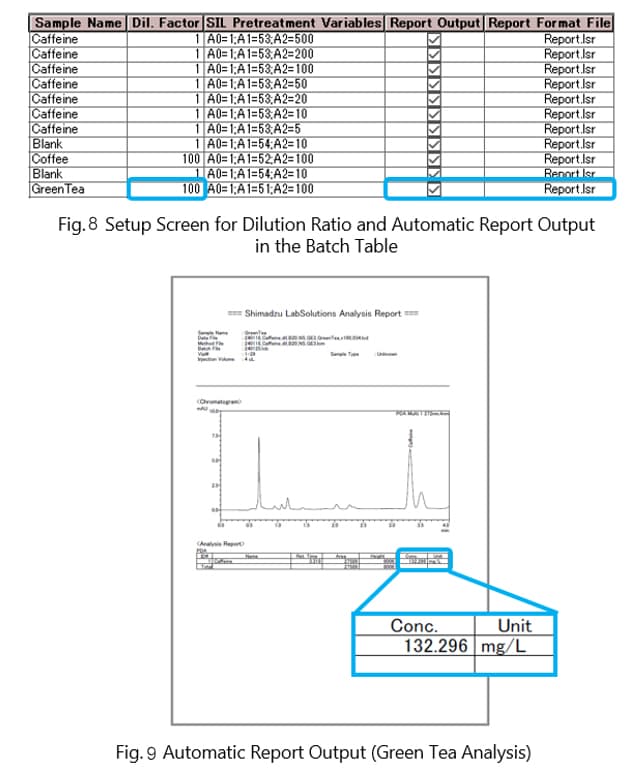
After entering the dilution factor of the analyzed sample in the dilution factor cell of the batch analysis table, the software displays the caffeine content of the original (stock) sample in the concentration column (not the concentration in the sample after automated dilution). Fig. 8 shows the dilution factor and automatic report output settings window for the batch analysis table and Fig. 9 shows an example report prepared automatically for an analysis of green tea.
Nexera Series Ultra High Performance Liquid Chromatograph
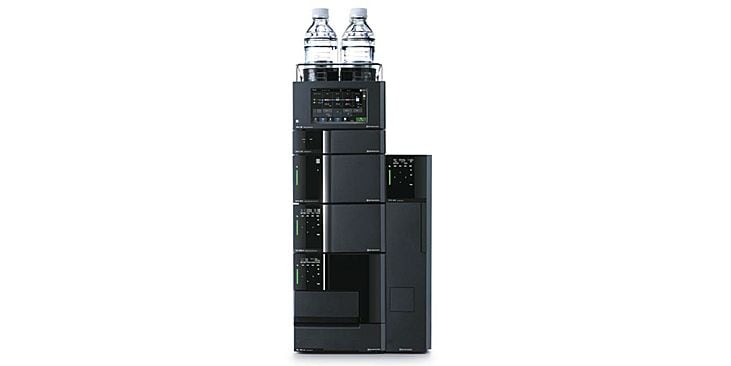
Nexera Series
Nexera comprises a family of high-performance liquid chromatography (HPLC) systems that set a new benchmark of industry standards thanks to the combination of advances in AI and IoT technology.